In-house AI Coding Agent Platform — Device Policy Guard and Usage Collection Server
Platform Part lead · design, operations, and merge approval; built with AI coding agents
2026-08-01 — present
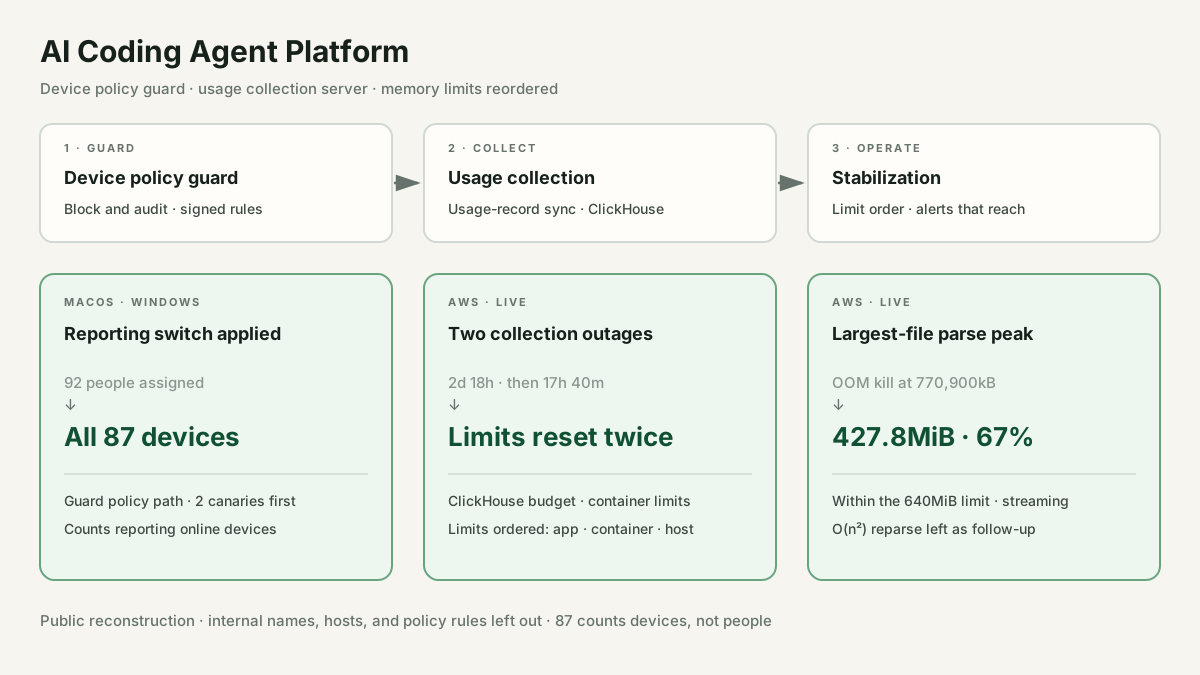
Owned design, operations, and merge approval for the company-wide device policy guard and usage collection server; AI coding agents handled implementation. The guard's policy path switched usage reporting on for 92 people, and all 87 reporting devices applied it. After two collection-server outages (2 days 18 hours, then 17 hours 40 minutes), memory limits were reordered as app < container < host and parsing moved to streaming, bringing the largest file's parse peak to 67% of a 640MiB limit.
Performance Metrics
- Devices applying the reporting switch
- All 87
- 92 people assigned · reporting online devices
- Collection server remediation
- Budget and limits explicit
- Applied after a 2-day 18-hour 31-minute outage; a reparse loop remains the likely trigger
- Largest-file parse peak
- Before: OOM kill at 770,900kBAfter: 427.8MiB
- 67% of the 640MiB limit · streaming parse
- Alert notification changes
- Mentions on 5 alerts
- Added after 47 firings with no human messages over 3 days; shared routing unchanged
Problem Solving
As AI service use grew, requests that would publish or share company material outside had to be blocked and recorded at the moment they ran, on both macOS and Windows and across a mix of subscription plans.
- Symptom: No way to block and record requests that publish or share material
- Fix: Device daemon: block policy violations · notify · audit
- Fix: Guard server: device registration · heartbeats · signed rules only
- Result: All 87 reporting devices apply the reporting switch (92 people assigned)
A resident daemon blocks policy-breaking publish and share requests, notifies the user, and records each attempt. A guard server registers devices through company-account OAuth (PKCE), collects heartbeats and block events, and sends only where a rule lives and its version; the daemon applies only signature-checked rules and keeps blocking when registration or reporting fails. The same policy path turned the usage-reporting switch on globally after two canary devices.
All 92 people on the active roster got the reporting switch, and all 87 reporting online devices applied it. macOS and Windows protection reports were confirmed; install, operations, and recovery guides were handed over, and the company-wide rollout belongs to another team.
The collection server, newly moved from an office NAS to AWS, was completely unresponsive for 2 days 18 hours 31 minutes and collected 0 records. The instance was running, with no error logs and no OOM kill.
- Symptom: Unresponsive 2 days 18 hours 31 minutes · 0 records
- Evidence: sar: memory 62.90% → 81.66% · page scan 153.77 → 332.58/s
- Ruled out: Disk · hypervisor contention · CPU credits
- Root cause: ClickHouse default budget 90% of RAM · shared host · no swap
- Fix: Explicit budget · mem_limit on the two large containers
- Result: One path closed · the trigger was likely a reparse loop
The last sar samples before the gap showed memory pressure (memory use 62.90%→81.66%, page scan 153.77→332.58/s); disk, hypervisor contention, and CPU credits (exhausted 38 hours in, a result) were ruled out with evidence. ClickHouse claimed 90% of RAM by default on a host shared with other containers and without swap, so it could thrash instead of OOM-killing. The budget is now explicit, and the two large containers got mem_limit.
That closed one path, a default budget taking over a shared host; analysis of the next outage with the same signature points to a reparse loop as this one's likely trigger too. Upsizing waited: before observing the fix, it would only have paid to cover a wrong setting.
Once memory limits were in place, the collection app hit 19 OOM restarts under a 512m limit; after the limit went up to 768m, the host stopped responding for 17 hours 40 minutes.
- Symptom: 19 OOM restarts · 17h 40m host stall after raising to 768m
- Ruled out: Explicit heap cap · the idle 241MiB baseline
- Evidence: Files with pending chunks reread whole · 254.3MB per cycle
- Root cause: File cap never hit · 2,048MB worker heap > host · 768m limit thrashes the host
- Fix: Lowered to 64MB, 256MB, 640m · streaming parse
- Result: Largest-file peak 427.8MiB (67% of 640MiB)
The first fix for the restarts, an explicit Node heap cap, was dropped before it shipped: measurement showed Node 22 already sized its heap at about 51% of the cgroup limit. The 241MiB baseline the limit was based on had also been measured at idle. The restarts and the 17h 40m stall shared one cause, an endless reparse where any file with a pending chunk was reread whole; at 512m the loop killed only the container and the host held. Once a 176MB file had 9 pending chunks, every cycle pulled 45 chunks, 254.3MB including that file, into a string array. The 512MB file cap never applied to a 176MB file, the 2,048MB worker heap exceeded host RAM, and the 768m limit, the only one that fired, pushed out page cache each time and thrashed the host; my own raise from 512m to 768m turned restarts into a host stall. A 64MB file cap, 256MB heap, and 640m container broke the loop; with chunk-by-chunk streaming in place, the file cap went back to 256MB.
Parsing the largest file now peaks at 427.8MiB, 67% of the 640MiB limit. The O(n²) pattern, where one pending chunk rereads the whole file, is split out as follow-up work.
Throughout the 17h 40m outage the alerts fired and reached their channel, but nobody saw them, and the same had happened in the outage of 2 days 18 hours before it.
- Symptom: 47 alert firings in 3 days · 0 human messages
- Evidence: 98 of 104 messages in 3 days from the bot · no mentions
- Root cause: Mention-free channel messages send no mobile push
- Fix: Shared routing left as is; fixed in the team-managed alerts
- Result: Mentions added to the 5 alert summaries
Of 104 channel messages over 3 days, 98 came from the bot and 0 from people, and none of the 47 firings carried a mention, so no mobile push went out. Shared routing and contact points stayed untouched; mentions went into the summary text of the 5 team-managed alert rules.
Without changing shared settings, mentions were added to the summary text of the 5 alerts.
Operating limits
Project Description
Once employees started using AI coding agents and AI services, two things were needed: a guard that blocks and records requests that would publish or share company material outside, and a collection server for Claude and Codex usage and skill metrics, which personal subscriptions do not expose to the company through an official dashboard. The guard is a resident macOS/Windows daemon with a guard server and console; collection syncs device usage records and aggregates them in ClickHouse. After the move from an office NAS to AWS, the outages that followed were worked through one cause at a time. Implementation was done with AI coding agents such as Claude Code and Codex; design and operational decisions, device QA, and merge approval were mine. Internal service names, hosts, and ticket numbers are generalized, and policy targets, rules, and blocking mechanics are left out of this public page.
Highlights
- Usage-reporting switch sent through the guard policy path after two canaries: 92 people assigned, all 87 reporting devices apply it
- Guard server sends only rule location and version; daemon applies only signed rules, keeps blocking if registration or reporting fails
- 2 days 18 hours unresponsive: thrashing with no OOM kill. ClickHouse's default budget (90% of RAM) on a shared host was found and the budget and container limits set explicitly; analysis of the next outage points to a reparse loop as the likely trigger
- 17h 40m stall: the file cap missed a 176MB file, the 2,048MB worker heap exceeded the host, and the 768m limit thrashed the host each time it tripped. Lowered to 64MB, 256MB, and 640m, plus streaming parsing: largest-file peak 427.8MiB (67% of the limit)
Tech Decisions
- ▶Synced records as the source of truth: device usage records backfill after an outage, and reparsing recomputes metrics.
- ▶Order the limits: app heap cap < container limit < host RAM; otherwise the app's cap never acts, or a tripped limit stalls the host.
- ▶Local blocking does not depend on the server: failed registration or heartbeats never stop it, and the daemon checks rule signatures.
- ▶Separate who can read what: the IT role that follows up on installs cannot see block events, which narrows who can read those records.
Lessons Learned
- •Judge a limit by what it allows and by what the host loses when it trips; my own raise turned container restarts into a host stall.
- •Defaults carry the assumptions of the machine they were set for; when a server moves, recompute its limits.
- •Measure a limit's baseline under load; a limit chosen from an idle reading breaks quickly.